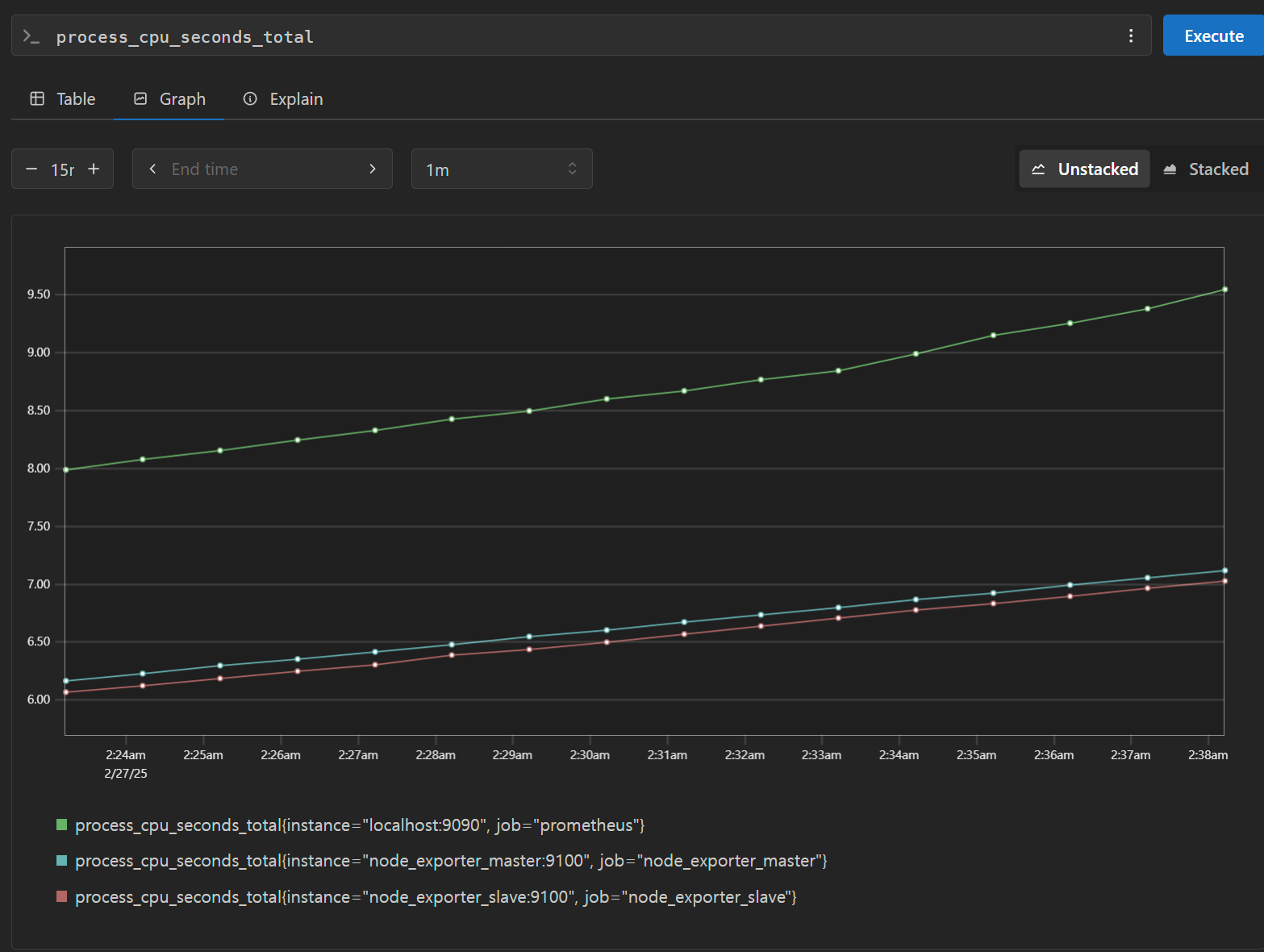

Docker-compose로 구성한 maser-slave이후
master에 import와 commit 이 끝났습니다.
모니터링은 위와같이 잘 되구요...
아! 이제 다 됐나 하고
MysqlWorkbench 에서 접속하니까! 스키마만 있네요...

그래서 sudo docker exec -it 이미지 bash
하고
mysql -u root -p
하고
보니까
mysql> SHOW SLAVE STATUS\G
Empty set, 1 warning (0.00 sec)
mysql> SHOW VARIABLES LIKE 'log_bin';
+---------------+-------+
| Variable_name | Value |
+---------------+-------+
| log_bin | ON |
+---------------+-------+
1 row in set (0.01 sec)
mysql> SHOW BINARY LOGS;
+---------------+-----------+-----------+
| Log_name | File_size | Encrypted |
+---------------+-----------+-----------+
| binlog.000001 | 2976737 | No |
| binlog.000002 | 157 | No |
+---------------+-----------+-----------+
2 rows in set (0.00 sec)
음,,,로그는 받고 있네요?
확인해봅시다
SHOW VARIABLES LIKE '%master%';
+------------------------------------------------+-------+
| Variable_name | Value |
+------------------------------------------------+-------+
| binlog_rotate_encryption_master_key_at_startup | OFF |
| master_info_repository | TABLE |
| master_verify_checksum | OFF |
| sync_master_info | 10000 |
+------------------------------------------------+-------+
MASTER-SLAVE 연결을 다시해야겠네요.
Master를 봅시다(마스터에)
SHOW MASTER STATUS\G
*************************** 1. row ***************************
File: mysql-bin.000003
Position: 어쩌구저쩌구
Binlog_Do_DB:
Binlog_Ignore_DB:
Executed_Gtid_Set: 어쩌구저쩌구
1 row in set (0.00 sec)
이런 데이터가 나오면 그걸 메모해둡니다.
현재 저는 Docker로 운영중이라 IP가 안보입니다.(docker ps를 해도)
docker inspect master_container_id | grep IPAddress
로 확인 가능합니다.
docker inspect -f '{{range .NetworkSettings.Networks}}{{.IPAddress}}{{end}}' mysql-master
로도 가능합니다.
이후
Slave 서버에서 입력하세요!
CHANGE MASTER TO
MASTER_HOST='마스터_IP',
MASTER_USER='replication_user',
MASTER_PASSWORD='password',
MASTER_LOG_FILE='binlog.000001', -- Master의 현재 로그 파일명기입
MASTER_LOG_POS=시작위치; -- Master의 현재 포지션기입
START SLAVE;
여기에 반영해줍니다.
이후
SHOW SLAVE STATUS\G
를 입력하여 확인해줍니다.
그럼 아까랑 다르게(제경우에는)
없던 정보들이 반영되어서 길게 나옵니다.
mysql> SHOW SLAVE STATUS\G
*************************** 1. row ***************************
Slave_IO_State: Connecting to source
Master_Host: 172.18.0.3
Master_User: root
Master_Port: 3306
Connect_Retry: 60
Master_Log_File: mysql-bin.000003
Read_Master_Log_Pos: 4248505
Relay_Log_File: e25028bcf727-relay-bin.000001
Relay_Log_Pos: 4
Relay_Master_Log_File: mysql-bin.000003
Slave_IO_Running: Connecting
Slave_SQL_Running: Yes
Replicate_Do_DB:
Replicate_Ignore_DB:
Replicate_Do_Table:
Replicate_Ignore_Table:
Replicate_Wild_Do_Table:
Replicate_Wild_Ignore_Table:
Last_Errno: 0
Last_Error:
Skip_Counter: 0
Exec_Master_Log_Pos: 4248505
Relay_Log_Space: 157
Until_Condition: None
Until_Log_File:
Until_Log_Pos: 0
Master_SSL_Allowed: No
Master_SSL_CA_File:
Master_SSL_CA_Path:
Master_SSL_Cert:
Master_SSL_Cipher:
Master_SSL_Key:
Seconds_Behind_Master: NULL
Master_SSL_Verify_Server_Cert: No
Last_IO_Errno: 2005
Last_IO_Error: Error connecting to source 'root@ 172.18.0.3 :3306'. This was attempt 1/86400, with a delay of 60 seconds between attempts. Message: Unknown MySQL server host ' 172.18.0.3 ' (-2)
Last_SQL_Errno: 0
Last_SQL_Error:
Replicate_Ignore_Server_Ids:
Master_Server_Id: 0
Master_UUID:
Master_Info_File: mysql.slave_master_info
SQL_Delay: 0
SQL_Remaining_Delay: NULL
Slave_SQL_Running_State: Replica has read all relay log; waiting for more updates
Master_Retry_Count: 86400
Master_Bind:
Last_IO_Error_Timestamp: 250227 03:31:53
Last_SQL_Error_Timestamp:
Master_SSL_Crl:
Master_SSL_Crlpath:
Retrieved_Gtid_Set:
Executed_Gtid_Set:
Auto_Position: 0
Replicate_Rewrite_DB:
Channel_Name:
Master_TLS_Version:
Master_public_key_path:
Get_master_public_key: 0
Network_Namespace:
이제 dump를 빼줍니다.
bash-5.1#
mysqldump -h localhost -u root -p비밀번호 --all-databases --master-data --triggers --routines --events --set-gtid-purged=OFF > dump.sql
mysqldump: [Warning] Using a password on the command line interface can be insecure.
WARNING: --master-data is deprecated and will be removed in a future version. Use --source-data instead.
2개의 경고는 비번 바로치지말고 다음버전 명령어 호환관련입니다.
이제 dump.sql을 찾아줍니다.
ash-5.1#
ls -l dump.sql
-rw-r--r--. 1 root root 4823192 Feb 27 03:44 dump.sql
bash-5.1#
head -n 5 dump.sql
-- MySQL dump 10.13 Distrib 8.0.41, for Linux (x86_64)
--
-- Host: localhost Database:
-- ------------------------------------------------------
-- Server version 8.0.41
확인해보면 잘 나왔습니다.
SLAVE에 MASTER 데이터 탑재하는 방법입니다.
SLAVE에서
mysql> STOP SLAVE;
Query OK, 0 rows affected, 1 warning (0.01 sec)
mysql> RESET SLAVE ALL;
Query OK, 0 rows affected, 1 warning (0.02 sec)
리눅스에서에서
[ec2-user@ip-10-0-9-187 ~]$
sudo docker cp mysql_master:/dump.sql ./dump.sql
Successfully copied 4.83MB to /home/ec2-user/dump.sql
잘 나왔습니다.(컨테이너-마스터에서 ==> 리눅스로)
[ec2-user@ip-10-0-9-187 ~]$
ls -l dump.sql
-rw-r--r--. 1 root root 4823192 Feb 27 03:44 dump.sql
[ec2-user@ip-10-0-9-187 ~]$
sudo docker cp ./dump.sql mysql_slave1:/dump.sql
Successfully copied 4.83MB to mysql_slave1:/dump.sql
mysql_slave1으로 잘 옮겨갔습니다.
SLAVE에
[ec2-user@ip-10-0-9-187 ~]$
sudo docker exec -it mysql_slave1 bash
접속해서
mysql -u root -p비밀번호호 < dump.sql
으로 데이터를 넣습니다.
mysql: [Warning] Using a password on the command line interface can be insecure.
비밀번호를 터미널에 치지 말라는 경고가 뜹니다.
mysql -u 계정명 -p
으로 들어가고
mysql> CHANGE MASTER TO
-> MASTER_HOST='마스터명',
-> MASTER_USER='root', # 슬레이브가 1개에 테스트 환경이라 root로.
-> MASTER_PASSWORD='복제전용 or 통일비번(테스트환경)',
-> MASTER_LOG_FILE='mysql-bin.000003', # 위에서 길게 나왔던 그대로 입력하세요
-> MASTER_LOG_POS=4248505; # 위에서 길게 나왔던 그대로 입력하세요
Query OK, 0 rows affected, 8 warnings (0.03 sec)
mysql> START SLAVE;
Query OK, 0 rows affected, 1 warning (0.07 sec)
SHOW SLAVE STATUS\G
했을때 아래와 같으면 성공입니다.
Slave_IO_Running: YES
Slave_SQL_Running: Yes
####################
컨테이너간 핑 테스트
기본적으로 mysql오피셜 이미지는 경량화를 해서 뭔가설치시에
microdnf를 사용합니다.
microdnf install iputils
로 ping을 설치할수있습니다.
컨테이너는 원래 이렇게 설치하는게 아니지만 테스트 환경이니까 해봅시다.
bash-5.1# ping mysql_master
PING mysql_master (172.18.0.3) 56(84) bytes of data.
64 bytes from mysql_master.docker-files_app_network (172.18.0.3): icmp_seq=1 ttl=127 time=0.060 ms
64 bytes from mysql_master.docker-files_app_network (172.18.0.3): icmp_seq=2 ttl=127 time=0.061 ms
64 bytes from mysql_master.docker-files_app_network (172.18.0.3): icmp_seq=3 ttl=127 time=0.065 ms
64 bytes from mysql_master.docker-files_app_network (172.18.0.3): icmp_seq=4 ttl=127 time=0.068 ms
^C
--- mysql_master ping statistics ---
4 packets transmitted, 4 received, 0% packet loss, time 3048ms
rtt min/avg/max/mdev = 0.060/0.063/0.068/0.003 ms
잘 갑니다.
저는 replica에서 문제가 생겼습니다.
연결은 됐는데 IO Running이 YES가 아니더라구요
Slave_IO_Running: Connecting
Slave_SQL_Running: Yes
root지만 복제 권한 문제같아서(Last_IO_Error: Error connecting to source 'root@mysql_master:3306'. This was attempt 1/86400, with a delay of 60 seconds between attempts. Message: Access denied for user 'root'@'172.19.0.6' (using password: YES))
권한 부여를 시도했습니다.
MASTER에서 합니다!
mysql> ALTER USER '이미있는 계정 전 root 썼어요'@'%' IDENTIFIED WITH mysql_native_password BY '비밀번호';
mysql> GRANT REPLICATION SLAVE ON *.* TO '계정명@'%';
mysql> FLUSH PRIVILEGES;
Query OK, 0 rows affected (0.00 sec)
반영해줍니다.
SLAVE에서!!
STOP SLAVE;
CHANGE MASTER TO
MASTER_HOST='mysql_master',
MASTER_USER='계정명',
MASTER_PASSWORD='비밀번호', -- 아까 만든거 사
MASTER_AUTO_POSITION = 1;
START SLAVE;
SHOW SLAVE STATUS\G
#################
mysql> SHOW VARIABLES LIKE '%gtid%';
+----------------------------------+---------------------------------------------+
| Variable_name | Value |
+----------------------------------+---------------------------------------------+
| binlog_gtid_simple_recovery | ON |
| enforce_gtid_consistency | ON |
| gtid_executed | 0c02a84a-f4a4-11ef-8e34-0242ac120003:1-9977 |
| gtid_executed_compression_period | 0 |
| gtid_mode | ON |
| gtid_next | AUTOMATIC |
| gtid_owned | |
| gtid_purged | |
| session_track_gtids | OFF |
+----------------------------------+---------------------------------------------+
9 rows in set (0.01 sec)
mysql> SELECT @@GLOBAL.GTID_EXECUTED;
+---------------------------------------------+
| @@GLOBAL.GTID_EXECUTED |
+---------------------------------------------+
| 0c02a84a-f4a4-11ef-8e34-0242ac120003:1-9977 |
+---------------------------------------------+
1 row in set (0.00 sec)
-- Slave에서 실행
STOP SLAVE;
RESET SLAVE ALL;
RESET MASTER;
-- GTID 상태 초기화
SET @@GLOBAL.GTID_PURGED='0c02a84a-f4a4-11ef-8e34-0242ac120003:1-9977';
-- 복제 설정
CHANGE MASTER TO
MASTER_HOST='컨테이너명-마스터꺼',
MASTER_USER='유저명',
MASTER_PASSWORD='바밀번호',
MASTER_AUTO_POSITION=1;
START SLAVE;
-- 상태 확인
SHOW SLAVE STATUS\G
Slave_IO_Running: Yes
Slave_SQL_Running: Yes
잘 됐습니다.
SLAVE를 구성해도 그 이전 입력값은 없습니다.
그래서 그걸 미리 dump.sql을 덮어줘야합니다.
# Master 컨테이너에서
mysqldump -u root -p --all-databases --master-data=2 > backup.sql
# 여기서 정확한 Master의 root 비밀번호 입력
docker cp mysql_master:/backup.sql .
docker cp backup.sql mysql_slave:/backup.sql
# Slave 컨테이너에서
mysql -u root -p
# yml에 설정된 Slave의 root 비밀번호 입력
# MySQL 프롬프트에서
STOP SLAVE;
RESET MASTER;
RESET SLAVE;
exit;
# 그 다음 복원
mysql -u root -p < backup.sql
# yml에 설정된 Slave의 root 비밀번호 정확히 입력
이제 USE 하고 확인해보면!
mysql> SHOW TABLES;
+-----------------------+
| Tables_in_flight_data |
+-----------------------+
| booking |
| flights |
| forprice |
| test_slave |
| user |
+-----------------------+
5 rows in set (0.00 sec)
GTID 방식의 마스터-슬레이브 세팅
차이:https://scolpion.tistory.com/131
-- 먼저 기존 slave 설정 초기화
STOP SLAVE;
RESET SLAVE ALL;
-- 새로운 설정 적용
CHANGE MASTER TO
MASTER_HOST='mysql_master',
MASTER_USER='계정명',
MASTER_PASSWORD='비밀번호',
MASTER_AUTO_POSITION=1;
-- Slave 시작
START SLAVE;
-- 상태 확인
SHOW SLAVE STATUS\G
'SQL&DB' 카테고리의 다른 글
| MYSQL-DOCKER 에서 데이터 탑재 (0) | 2025.03.04 |
|---|---|
| DB 두 가지 복제 방식을 비교 (0) | 2025.02.27 |
| mysql-commit (0) | 2025.02.27 |
| Proxysql 설정시 에러사항 경험 (1) | 2025.02.19 |
| grafana 와 prometheus 연결 (0) | 2025.02.18 |